You must log in or # to comment.
In KDE the more you shake the mouse the bigger the cursor gets till it takes up one whole screen
I learned recently it comes from MacOS (at least MacOS does it too)
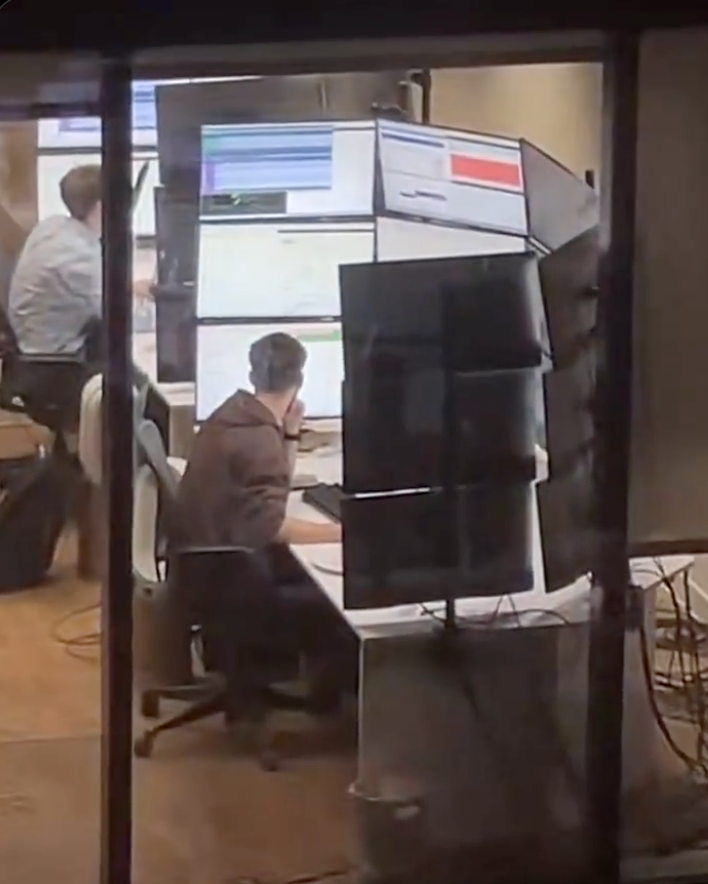
I work at a stock brokerage and I can confirm this is exactly the screen layouts these people have. By these people I’m talking about day traders I don’t actually know what this person is doing.
And yes they do look across all of those screens. I sat next to a guy who had six screens arranged in 3x2, the way he explained it he has all sorts of programs mostly in the domains of communication and news and he doesn’t even look at the other screens but when something moves it triggers his peripheral vision and he acts on it. Another day trader I know has nine screens in 3x3 but he only uses the bottom half of his screen real estate because he can’t read the top, he just likes having a big rectangular-like screen.
It’s all about peripheral vision to these kinds of professionals. They are 100% not looking at all of those screens, they just need to set up things to react to.
This guy is a meme though nobody is reacting to something happening right above your head.
On KDE Plasma when you shake the cursor it gets bigger, with no size limit.
On macOS it also does but there is a limit.
I don’t know whether Windows does because I’ve never used it, but I’d assume so.
Neither do I know about other DEs.
I saw a bug report when KDE Plasma 6 was released that the cursor keeps growing indefinitely. A dev responded like “yeah I noticed that but decided it’s actually a great feature”
I think you can enable something where you can press control and it will put a big circle around your cursor but it’s not enabled by default which is stupid and it’s not obvious because it’s a random keyboard key.
It’s a utility under PowerToys called Find My Mouse.
You can set it to either double pressing the left or right Control key, shake the cursor or a custom shortcut.
This has been a godsend for me…I have a pair of 35" ultrawides and I was constantly losing the mouse due to the fact that my desktop is 70" wide lmao
For those interested, there is a gnome extension called Wiggly that does this a similar thing.
Used to be called Wiggle, but development and bug fixing seems to have stopped on that one.
Windows doesn’t. I lose my cursor all the time even though I made it neon green.
Doesn’t Windows have the option to configure a hotkey to indicate cursor location? Maybe in the accessibility settings or something? It’s been a while since I’ve used Windows.
Yeah double tap control
I’ve known people who have had the same issue and they not only turn it neon green but turn on mouse trails to an extreme degree. If you draw a little circle with your hand it’s very easy to spot.
I’ll have to give that a shot at work
I was about to say this same thing. It’s such a fantastic feature.
Hivemind. Came here to say this. I lose so much time shaking that damn thing.
This is it. This is the threshold of where a VR headset and a virtual desktop manager makes more sense.
I can’t believe no one’s posted this yet

As much as I’m an advocate for VR I don’t think I’d want to spend 8 hours in a rig. I look like I’ve been wearing ski goggles as it is and that’s only after two or three hours.
Props for even being able to be in for 2 or 3 hours.
I get this uncanny valley feeling after only an hour. If the motion sickness doesn’t get me first.
I think I’d still rather this than have a heavy device on my head, an umbilical, and motion sickness.
I think I’d still rather this than have a heavy device on my head,
I’ve wondered about this, actually. We’d need necks like an NFL linebacker.
an umbilical, and motion sickness.
Joking aside, that’s a legit concern. It’s not for everyone, that’s for sure.
What extreme office activities are you doing that you would suffer from motion sickness?
I am saying VR will give me motion sickness.
Having 35 monitors won’t
I refuse to believe that this setup is actually efficient. You cannot possibly actually need that much information on screen at the same time. I think Houston mission control has less going on than this.
This is just having a lot of screens for the sake of it.
keeps him warm ?
He uses them to work on his code and his tan.

This guys been waiting for his moment
Maybe that would be a better screen setup?

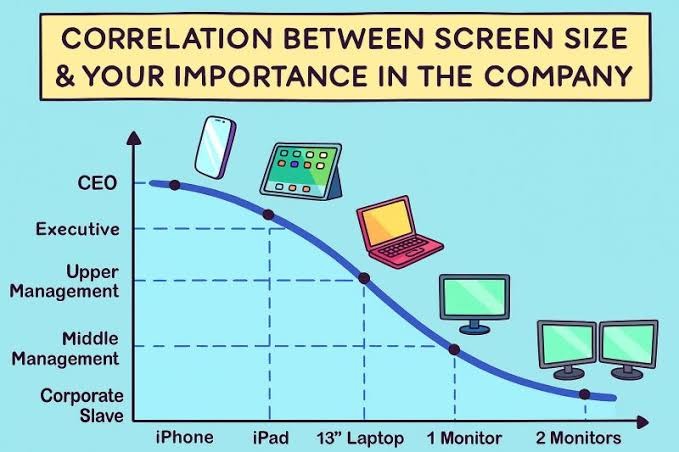 I guess we need to extend this chart somewhat…
Those executive ultrabook, touch screen super thin and lites are such shit. Fragile, usually run hot, sometimes the SSD is even soldered, and fuck you if you want to get parts or service.
The most important is at the bottom of that curve, right?


Well, yes, but also the lowest-paid.
Yeah it starts ticking back up after 2 monitors
It really doesn’t, and I say that as someone who often had 3 or 4 monitors on his desk 😂
in the mean time some of the executives replaced themselves with an assistant using AI responses and they haven’t done any work in over a year and somehow we are saying they were important.
Five or more monitors is typically for traders watching charts and news simultaneously. Those rake in a bit more than grunts.
And you go back down to a laptop for mechanics and the like
For sysadmins, it’s one of these pocket-sized things to plug into the kvm and figure out the issue.

The salary you make doesn’t say much about your position in the company. Traders are still wage slaves IMHO, they’re just paid more than others, and only if they’re successful.
Needs a log scale x-axis
Yeah and the wild thing is that the importance axis is cut-off, by the time it reaches 10+ screens that’s the single most important employee who if they were runover by a bus tomorrow, the company will just randomly implode one day when something only they know how to maintain just falls over and no contractor can untangle the spaghetti infrastructure.
The thing is, they haven’t had a pay rise since screen 6 but somehow are just unphased even by inflation.
nope. you just need to adjust a few things. 2 monitors for corporate serfs (rename middle management to serfs) and 4+ for corporate slaves. upper management gets a laptop and a normal monitor. executives can stay the same. CEO needs 2 phones.
CEO needs 2 phones
Is the second one for the coke dealer?
coke, prostitutes, bribery, etc.,
I should get a second phone
c-suite material
no it’s for their new Epstein style dealer
I think the current dogma is CEO gets a phone with 2 screens.
Soon to be 3 with the Samsung (You can’t afford it anyways).
why the fuck would I want a 2 or 3 screen phone. have you seen how flimsy and breakable they are?
If you can afford a 3 screen phone. You wouldn’t need to worry about the cost.
Okay I use a 50” TV as a monitor. What am I?
Unemployed?
Shake till it gets big
😐 What gets big exactly?
It’s a feature in KDE that if you shake or move the mouse fast the cursor gets bigger so you can find it.
Debian 13 + KDE Plasma - Why does the mouse get so huge? HAAAAHAHAHAHA
My favorite part is that it keeps getting bigger as you continue shaking it, eventually resulting in a big-ass cursor that can’t be contained in one display lol
…What? I was bored…
I, too, use KDE at work.
macOS also has this feature under the name “Shake mouse pointer to locate”.
KDE’s is different (and better) in that it seemingly has no cap on the size you can make the cursor. You can get your cursor bigger than your display.
Yeah I think it been a Mac feature since like 2018, but more newly adopted in KDE. But either way it’s just a helpful UX idea, and potentially aligns with someone’s behavior of just like moving the mouse fast to verify it’s still working
Apple added it in 2015.
It was on Linux longer. The focus follows the mouse was another that I would like to see native
It was on Linux longer.
I’m fairly sure that didn’t become a thing in KDE until 2024 or 25
Windows, since 7 (2009ish), had a feature to hit CTRL which zeros in on the mouse to find it if you can’t find it. On my 3x 19" LCDs I had, it was handy to have that 3" circle close in on it.
Enable it under mouse settings, not automatic.
I’m vaguely sure this was already in MacOS when I got my Macbook in early 2010s.
KDE Plasma is so fucking good these days it’s amazing to me that people voluntarily use Windows
There’s a gnome extension called Wiggly that does a similar thing 👍
HOLY SHIT THAT’S WHY IT DOES THAT?!?!?! I learn something new about Linux on this platform every day.
Hell yeah! And if you do a three finger pinch on a trackpad it does a magnifying zoom onto your cursor! Super handy on my 13" laptop
It is also a sexual innuendo.
I wanna put that in your end-o, if you know what I meANALSEX
meANALSEX
As subtle ass a pounding
That pun went right over my head.
And then moved back and forth rapidly, until I had an orgasm and ejaculated my semen into it.
It’s so well implemented, I sent it to a bunch of my friends saying something like “good accessibility and good design often are the same thing”
Accessibility causes developers to implement users a choice on design.
The original intent of css was we’d influence pages with out own design but that never happened.
Night mode is accessibility lifted to a feature.
Still doesn’t help in finding where your cursor is currently.
Even worse when running multiple VMs.
Half a dozen blinking cursors, but only one of them is actually active…Same in macOS
“yes”
There is a function on linux that makes the cursor expand in size when you wiggle furiously for a few seconds
“Wiggle furiosly” sounds like a great way to spend saturday night.
Sure. It was called Wii Sports back in 2006.
I’ve put a hole in 3 monitors that way. At once.
Pp
Is there a way to define a home location for the cursor and have a key combination to send it there?
xdotool mousemove 0 0Replace the
0 0with your desired coordinates if you don’t want the ‘home location’ to be at the top left.Then use xbindkeys to bind your desired key combination to run that command.
Oh my god. You just revolutionized my gaming with this. I’ll never have a moment of “oh no my cursor is on another monitor” again!
Thank you!!

his background image:

I just saw a windows 95 era gradient until i zoomed in
Whoa, slow down there Satan.

Too real
A least he’s getting enough light. Maybe not the right wavelength though.
I was going to say his vitamin D intake is at least taken care of.
If I had that many screens I would at least put everything in dark mode.
If I had that many screens I would at least put everything in dark mode
Oh my god, right? That shit’s gotta put you in “All work and no play make Jack a dull boy” mode toute suite lmao
Those little monitor bracket clamps vs the edge of that desk…
I have had friends and coworkers send this meme to me repeatedly because my WFH setup is closer to this than I’d like to admit. Fuck it though, I find it helpful.
Bro, I have one coworker that does his work on a 14" laptop, no external mouse or keyboard.
I have no idea how. I have minimum 15 windows open at once and am going back and forth on them or have 4 windows open at once in my monitors to compare data and make markups. And ofc a nice keyboard and mouse. Laptop gets shoved out of sight.
I feel like he’s either really slow or not doing any work at all.
And then I feel guilty because I don’t work hard enough 🙄
The answer is he is really slow.
I have that same coworker.
He’s the true definition of a grinder. Works on a laptop screen with only touchpad. He works 7 days/week and 9 hours/day to keep up productivity. I have no idea why.
I told Mgmt to please for the love of God buy him a monitor, and a mouse. My coworker refused both…
Yeah makes me feel like I’m so efficient I don’t need to work near as much as I do!! But honestly my job is pretty easy, I’m under utilized and while its boring, its not bad and I get paid enough.
I did this. works fine for me because I am efficient with virtual desktops.
Wtf is this ? What the hell are they doing that requires 15 screens ?
Reminds me of the workstation from
“Halle Berry’s Breasts: The Movie”Swordfish.
“Halle Berry’s Breasts: The Movie” We need more of these
I think they’re great the way they are but maybe somebody will remake Total Recall again with her as Mary.
“Halle Berry in a Bikini: The Younglings Awakening - A Kids Movie”The Flintstones
Despite the movie itself sucking, that’s a rad looking setup. I mean, it would suck to use for actual work, but its cool as hell.
🤢
What aren’t they doing?
IDK but I’ve seen pics of 911 operator setups with some absurd number of screens and I bet there’s a lot of stuff that would be useful for them to have open.
Makes sense yeah. I guess at this point it’s a monitoring station more than a computer, i.e the operator is not gonna have many interactions with it other than looking at the screens
My parents were 911 dispatchers for decades. It’s how they met. They had 7 monitors last time I visited them at work 20 years ago. Their applications seemed to be built on the idea they had multiple monitors worth of space that they’d be stretched across.
If I remember accurately, there were 2 computers (and thus 2 mice and 2 keyboards). The first computer had 5 monitors and was the Google Maps equivalent for where all the active ambulances in the city were. The main application stretched across multiple monitors and had sub-windows with different operations in them. I think it also managed the radio between dispatcher and ambulance. The second computer was dedicated to the phone, the caller, any history attached to the phone number, and all the data 911 gets about your location. It took up the remaining few monitors. By now it’s probably 1 computer and even more monitors.
Separate computers may be due to necessity. For example, one of the systems they need may have a provided computer to handle it that is managed and supported by that vendor on a separated network for security.
Yeah, but not that many.
Usual setup nowadays: One monitor for the main CAD (computer aided dispatch) forms, one for map overview, eventually a third one for a unit overview(theye are often done on the map monitor these days), one for external data (browser window, video feeds,etc.), one below as a touchscreen for communication control (VoIP/Radio).
Most EMS Dispatch clients I have switched to a three+one touch setup ages by now and rather use a central dashboard for some less important views and feeds.
It’s 4. My daughter is an operator.
I have a friend who works for Transpower (company in charge of NZ electric grid) and occasionally goes into their control rooms. Apparently they have set ups like this. It gets worse, because there are several computers hooked up to the different monitors, so not only do they have a wall of monitors, they have a bunch of different keyboards and mice (mouses?) that they have to hunt through if they want to actually interact with something
They need to invest in some KVM switches. Just leave the monitors connected directly to the towers but route the input devices through the switch. There’s no good reason for a single person to face more than one keyboard and mouse at the same desk.
There’s plenty of good reasons. Redundancy, simplicity, speed, physical context switching…
Redundancy for a keyboard and mouse? Keep an extra set in the drawer or something. No need to have them all out and connected. Simplicity? How is it simpler to have multiple input devices littered about than one set? You can’t really physically use multiple at once. Speed? Speed of what? Of input? The latency on a KVM is negligible, particularly for an IO device? Speed of swapping? With multiple keyboards and mice, you have up manually move around devices and/or your body. With a KVM, you press a button. How is that slower?
Physical context switching is the only thing I’ll grant you, but I don’t see how that’s such a benefit compared to the hassle, clutter, and hectic work flow when you can just use a KVM.
We’re probably thinking about very different work environments.
Redundancy is more about not having a single point of failure. If you have a need for a redundant system, having a single point of failure in the KVM means you no longer have cc a redundant system.
For me, I find it simpler having a dedicated keyboard and mouse per computer, mainly to avoid the mad wiggle of the mouse to find the cursor, and then wiggle again because you found the cursor but it’s not moving, has it crashed? Oh that’s right, I’m using a KVM, and I’m controlling the computer that’s over there. With dedicated keyboard and mouse, it’s always obvious which machine I’ll be controlling. And yeah, I meant slower to switch. You need to move your hand off the keyboard to press the button, then move your hands back, usually having a slightly awkward pause when it takes a moment to register the switch. With dedicated keyboards, you move your hands once, done.
And I can think of plenty of scenarios where you want to do an action at the same time on two machines. Want to compare two copies of a document across the two machines? Left hand on page down for one machine, right on the other. Trying to test a bug that mucks up the timing of a jump in a game on one system but not the other? Spacebar at the same time. Going through the same install process simultaneously on 4 machines? It either takes four key presses on different keyboards to select an option, or four key presses and four KVM button presses.
For a lot of stuff, KVM is the way to go, especially if you tend to just do a bunch of stuff on one machine, then do a bunch of stuff on another. For a lot of situations though, such as if you’re having to only do occasional stuff, or doing lots of small things on different machines, it’s not the way to go.
I did not expect to be writing such a detailed essay on such a trivial thing today, so thanks for coming to my TED talk!
One of the operator pulpits at my work can be run by one pulpit operator, but commonly has multiple people in it - someone is almost always being trained, floor operators hang out on break or when maintenance has to take the machine for a while, lead operators and supervisors and quality personnel stop in to monitor. They have I think five computers, all with their own keyboard and mouse. The operator mainly interacts with just one, and the others are set up for reference spread all around the edges of this room that comfortably holds five people. It works pretty well because the auxiliary people can look stuff up on the reference computers without having to take away keyboard or mouse control from the operator, and with how physically distant some of the machines are from each other, a switched keyboard would have to get carried around the room which would be annoying.
Sure but that is entirely different than having all of those monitors at the same single desk with multiple input devices only accessible by the one person at that desk.
Reminds me of VirtualBox on Wayland. It won’t correctly capture the mouse, so it just exits and re-enters the window in random positions. Say, on guest you see it in middle left, you move it a bit to the right, and it jumps out of bottom right corner.
So, time to have a second mouse, and do USB passthrough.
But also UEFI on my HP mini PC doesn’t work with every keyboard, so a second keyboard for UEFI.
Kiwi gang!
There’s
dozensat least three of us!Soon to be
fourthree and a halfI want to join, but they don’t let me
There is crossplatform software for mouse/keyboard sharing.
I work in ATC and we have several desks with around 12 to 18 screens. Not in that layout tho, but on a much larger banana form.
They are used at different support positions so not ATC radars. Mostly for monitoring but also used with keyboard and mouse.
The applications goes from technical surveillance of ops systems, to flow capacity (airspace capacity), meteo broadcast for all airports (ATIS) or ground-ground telecommunications of aeronautical data.
It’s the boss screen, in a second they will Alt-Tab into Flight simulator.
It’s a cropped version of a BBC office someone could see from their apartment
I remember that post, and that only makes it stranger. What is the BBC doing that requires that many monitors?
Gooning
I’ve seen stock traders where everyone on the floor had half that many. A few of them had 9.
When they’re looking up trades or news, they open a ridiculous number of windows while doing research.
They have 4 screens just to watch the markets and handle in-house controls.
What’s striking about this is the amount of whitespace on the screens. They are only using 1/2 - 1/4 of their screen space.
Traders love doing this
IIRC when keemstar posted it, it’s a BBC office
Not sure about this one, but I know quant traders sometimes like many screens with many dashboards for realtime trading.
Russian space program